When I choose a device for my son, I start with what he needs it to do, then choose the device that does only that. If he needs three things, I don't give him a device that does four. For calls, texts and location, that can be a watch.
My short answer
Both watches let your child call and text the people you approve, and let you see where they are. The Bark Watch adds message monitoring that alerts you to concerns such as bullying, self-harm or predatory behavior, and its location has updated faster and more reliably for us than my son's Apple Watch. The Bark Watch leaves out extras like maps and music. For some families, that's exactly what they want.
An Apple Watch adds options such as calling by voice with Siri, Maps and music. You need an iPhone to set up and manage it for a child. The Bark Watch works with an iPhone or an Android phone, and its cell service covers every US state except Alaska. For most families in the US, I'd pick the Bark Watch. It's simpler to set up than an Apple Watch, and its parental controls are tamper-proof: your child can't undo the contact and texting limits you set. If your child would use music or maps, the Apple Watch is the other one I'd look at.
Outside the US, I'd choose the Apple Watch, because the Bark Watch only works in the US. If you have an iPhone to set it up, a child's Apple Watch can get its own cell service in many countries. Apple lists them, with their carriers, on its Apple Watch cellular page.
Can a watch replace a phone?
Yes, if your child needs to call and text the people you approve, and you need to see where they are. A watch does all of that, with fewer features than a phone.
Neither watch I'd choose has a camera, and scrolling on a small screen is less likely and less attractive than on a phone, especially when there's nothing addictive on it.
The camera matters because of sextortion. Sextortion is when someone threatens to share a nude or sexual image of a child unless the child sends more images or pays money. A watch with no camera can't take those images. A phone's camera can be turned off: on an iPhone it's then unavailable, and on a Bark Phone, Bark's own Android phone, it's fully disabled from the Bark app. On Android phones other than the Bark Phone, it depends on the phone: sometimes turning the camera off in the settings doesn't stop it from working. Before I'd give a child a phone with a working camera, I'd want them ready for a conversation about sextortion.
A watch stops being enough when your child has a need it can't meet. When my son asked me what age he could get a phone, I told him it's not based on age, it's based on need. If there's something he needs, that we all agree he needs, and his watch can't do it, we'll look at it then.
Wanting something isn't the same as needing it. My son's watch is for staying in touch with family. When he asked to add a friend from across the street to his watch, my wife and I said no. Texting friends would change what the watch is for, and he can see his friend in person. If the need is one app, like a team or school chat, I'd run it on my own phone before getting my child a phone.
When there is a need a watch can't meet, the next device I'd choose is a locked-down smartphone, with almost everything turned off. You can turn on one feature at a time as your child needs it, without changing devices again.
Whatever device you choose, I wouldn't give it to a child before it's locked down. If a watch fits what your child needs, the next question is which one.
What I look for in a first watch
For a first watch, I want my child to be able to reach me, and I want to be able to reach them. That needs to work when the watch gets wet or takes a knock, after a day of battery use, and when my child is frightened. I don't want reaching a parent to depend on remembering a complicated sequence or entering a code under stress.
I want to control who can call and text, keep the watch quiet at school unless I deliberately interrupt, and avoid a camera. Those are the requirements I'd start with.
Location sharing, directions and music are separate choices. Some parents want those functions, while others value a watch that does less. I also want the option to keep the child's number when the watch is eventually replaced by a phone.
How Apple Watch and Bark Watch fit those choices
My son uses an Apple Watch, and I set up a Bark Watch on November 2, 2026. Those are the two watches I've reviewed so far. Both have excellent hardware. The Bark Watch in this comparison is a Samsung Galaxy Watch8 running Bark's software.
The parent's phone and the watch's service
You need an iPhone to set up and manage a child's Apple Watch. The child doesn't need an iPhone of their own. A child's Apple Watch has to be a GPS + Cellular model. Apple calls this setup Apple Watch For Your Kids. You can add a plan from a carrier that supports it during setup or later. The watch gets its own number once you activate cellular service. Its carrier can be different from the parent's.
The Bark Watch is set up by scanning the QR code on the watch with an iPhone or Android phone, then finishing on that phone. After setup, you can manage the watch in the Bark app or on Bark's website. The watch uses Bark's cellular service in the 48 contiguous states and Hawaii.
Who can call and text
Both watches let you limit who your child can call or text and who can call or text them.
On Apple Watch, those limits are in Screen Time on your iPhone, where you can manage your child's contacts and require your approval before they add someone new. Apple's controls work, but setting them up through Screen Time is notoriously difficult. The Bark Watch comes tamper-proof: your child can't turn off or get around its contact and texting limits, and they're easy to set up in the Bark app.
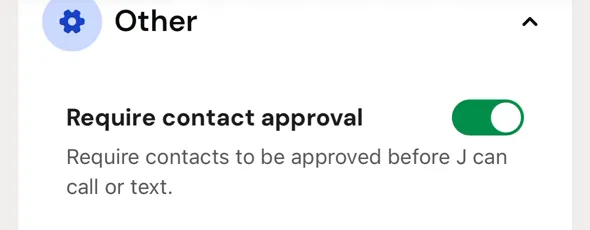
On the Bark Watch, the Require contact approval setting, in the Bark app or on Bark's website, limits calls and texts to approved and emergency contacts.
On Apple Watch, a call from an unapproved number can still go to voicemail if the watch has carrier voicemail. With Require contact approval on, Bark blocks unapproved callers from leaving voicemail.
What happens with messages
Both watches can receive photos and videos in a text.
On the Bark Watch, Bark checks texts and their attachments for concerns such as bullying, self-harm or predatory behavior. When Bark flags a message, it sends you an alert.
On Apple Watch, Communication Safety checks photos and videos in Messages for nudity. It also checks for gore and violence on version 27 or later of Apple's watchOS software. It blurs what it flags and shows a warning only to your child. Your child can use the warning to message a trusted adult.
Children 13 and older can choose to view the photo or video after another warning. For children under 13, a parent or guardian has to enter the Screen Time passcode before the child can view it, if a passcode is set. The age cutoff varies by location.
Reaching a parent or emergency services
With Siri turned on, your child can say "Call Mom" on Apple Watch. On the Bark Watch, they start the call in Phone or Contacts. Both watches let your child speak a text instead of typing it.
On Apple Watch, your child calls 911 by pressing and holding the side button below the round dial, then dragging the Emergency Call slider. If Hold Side Button to Dial is on, your child can instead keep holding the button: after a countdown, the watch calls emergency services by itself. That setting is in the Apple Watch app on your iPhone, under Emergency SOS for your child's watch.
On the Bark Watch, your child presses the top button on the right five times quickly, then swipes the emergency call icon to the right. The screen closes after a few seconds if your child hasn't swiped.
I'd practice calling a parent with my child and show them the steps to call 911.
During school
On Apple Watch, Schooltime blocks apps and notifications during the hours you set from your iPhone, and it turns on Do Not Disturb. Your child can still call 911 and call or text the people you've set as their emergency contacts. They can also leave Schooltime for a moment: they tap the screen, press and hold the round dial, then tap Exit. You get a notification when they do, and Schooltime comes back on by itself when they lower their wrist.
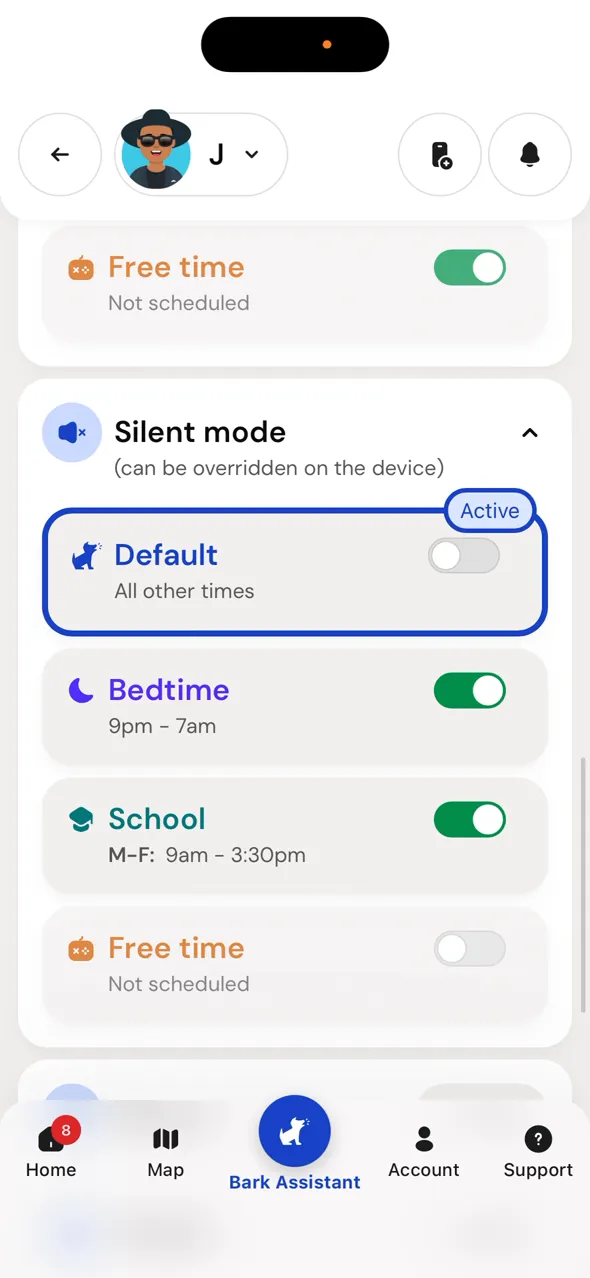
On the Bark Watch, you set a School routine for the hours you choose. In its settings, you can turn texting off and limit calls to the contacts you've marked as emergency contacts. You can also turn on silent mode, which mutes the ringer for calls and texts. Your child can turn the ringer volume back up on the watch, and the ringer mutes again the next time the routine starts. Your emergency contacts can still call your child during the routine, and text them if texting is on, but with silent mode on, the ringer stays muted for those calls too. If plans change, you can start a routine now or delay it from the Bark app.
Hardware, battery and charging
Both watches are water resistant. I see a protective case as a must-have for either one. Without a case, my son's Apple Watch screen got so badly damaged he could barely see what was on it. With a case, it gets almost no damage. The case has to match your watch's model and size: Apple Watch models come in different sizes, and your child's watch has its size engraved on the back. The Bark Watch comes in one size, 40 mm. On the Bark Watch, I use Spigen's Rugged Armor case. On my son's Apple Watch, I use Spigen's case with a built-in band. It comes in two sizes, one for 40 and 41 mm watches and one for 44 and 45 mm watches. As an Amazon Associate I earn from qualifying purchases.
When my son tried the Bark Watch, it lasted the whole school day. He left for school at about 8:15 a.m. and came home at 4 p.m. with 59% battery remaining, and he was using exercise tracking during that time.
Apple recommends the Apple Watch SE 3 for children and rates it at up to 16 hours on a charge when it's set up for a child, with cellular and location sharing on. I'd plan on charging either watch every night.
Directions and music
On Apple Watch, your child can get directions in Maps and, with a paid Apple Music family subscription, listen to Apple Music over Wi-Fi or cellular. The watch doesn't play music through its own speaker, so your child needs Bluetooth headphones or a Bluetooth or AirPlay speaker. Your child doesn't need an iPhone of their own for any of this. From your iPhone, you can restrict explicit content on your child's watch.
The Bark Watch I set up has a compass, but no maps or music. For some families, that's a feature in itself: the watch stays focused on calls and texts.
Location and whether the watch is on
Both watches show your child's location on your phone. For my son's Apple Watch, I use the Find My app on my iPhone. For the Bark Watch, the Map tab in the Bark app shows where it is. Bark's Find Watch button is for a lost watch: it makes the watch ring at full volume.
Location works better on the Bark Watch than on my son's Apple Watch. The Bark Watch updates its location faster, and my son's Apple Watch location sometimes doesn't work at all. We've had it fail many times and have stopped relying on it.
I also want to know if the watch is turned off or running low. The Bark app sends a notification to my iPhone when the watch is turned off. It also shows the watch's battery level and the last time the watch checked in with Bark.
How I set up the Bark Watch
In the Bark app, your child's profile has a section called Other. Its Require contact approval setting means a contact has to be approved before your child can call or text them. I turned it on.
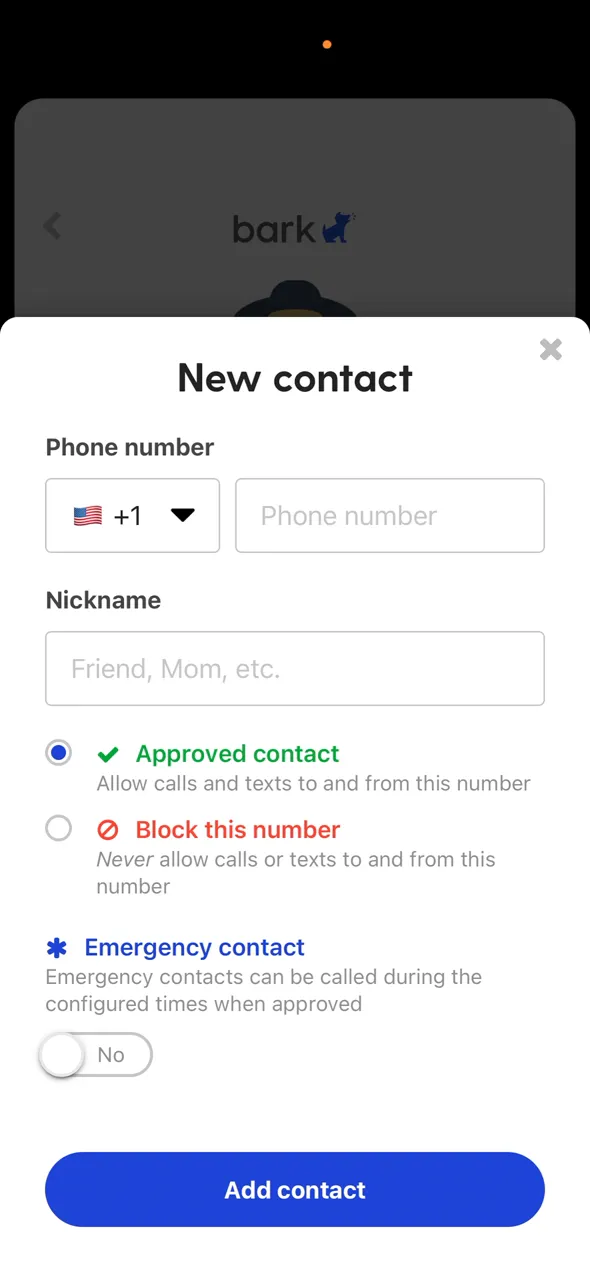
Contacts go in through the Add contacts button under your child's name. Each one is either approved or blocked, and an approved contact can also be marked as an emergency contact.
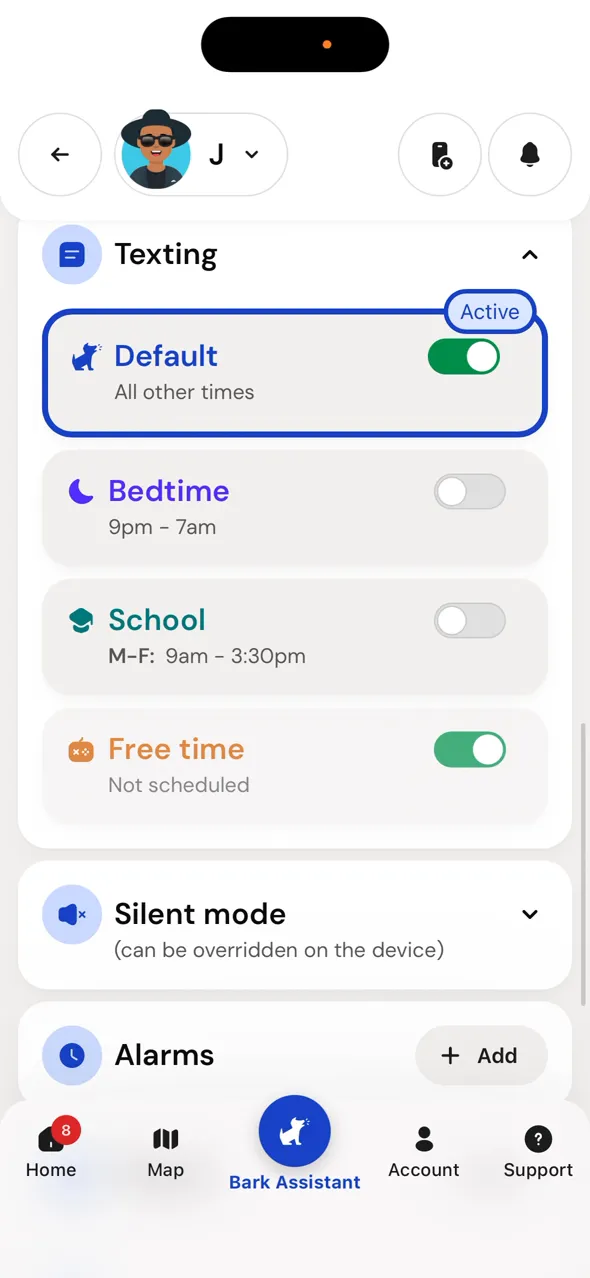
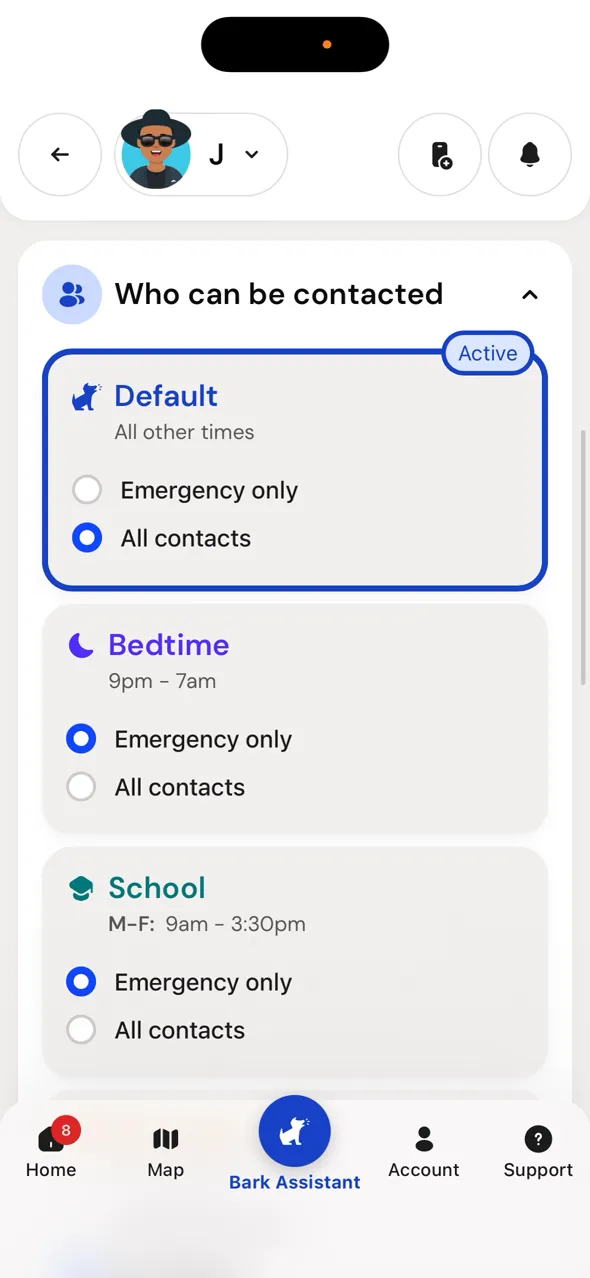
Your child's profile also has a Schedule, with routines such as Bedtime, School and Free time. I set the School routine for 9 a.m. to 3:30 p.m. on weekdays. Each routine has its own rules for who can be contacted, texting and silent mode. They're under Settings on your child's profile, not in the Schedule. In my School routine, I turned texting off and set contacts to Emergency only, and silent mode was already on for School. With that routine, a child can call their emergency contacts during school but can't text anyone, including those emergency contacts. Changes can take a few minutes to reach the watch.
The watch itself has a screen lock, a PIN or pattern set in the watch's Settings under Security and privacy, then Lock type. It's off unless you turn it on. I set a pattern. Your child enters the code when they put the watch on. Once they unlock it while wearing it, it stays unlocked until they take it off, so a call doesn't need the code while it's on their wrist. It also asks for the code after a restart. Your child can still call 911 from the locked watch. A forgotten code can't be reset, and the watch would need to be replaced.
The watch lives in two places: on its charger or on your child's wrist. Strapped to their body, it's harder to lose. I wouldn't take it away as a punishment. It's how you reach them and find them. I'd pick a well-made device, put a case on it and keep it charged. It's there for emergencies, so it has to work when they need it.
What the watches cost
The Bark Watch is $288 for the device, plus $15 a month for service. That monthly plan includes the cellular service, parental controls and message monitoring.
The 40 mm Apple Watch SE 3 with GPS + Cellular is $299. Its cellular service is a separate monthly plan from a carrier that supports Apple Watch For Your Kids. For example, Verizon lists its plan for Apple and Android watches at $15 a month, or $7.50 with a qualifying Verizon phone plan, plus taxes and fees. Apple's parental controls, such as Screen Time and Communication Safety, are built in rather than part of the monthly plan.
If the Bark Watch fits your family
If you want calls, texts with approved contacts, location sharing and message monitoring in one watch, here's the Bark Watch with my FAMILYITGUY discount. The code FAMILYITGUY takes $30 off the watch's price, and the link includes it.
This article is part of my paid partnership with Bark, and I earn a commission if you buy through that link, at no extra cost to you.